
Vue2 响应式原理最小实现
这篇文档不追求完整还原 Vue2 源码,而是聚焦面试里最常被问到的那条主线: 模板是怎么和 Watcher、Dep 建立关系的,以及数据修改后为什么能自动更新视图。
一、核心要点速览
💡 核心考点
- 模板不会直接绑定 Watcher:真正参与依赖收集的是模板编译后的
render函数。 - Watcher 是入口:组件初始化时会创建 Render Watcher,并主动执行一次渲染。
- getter 完成收集:
render访问数据时触发getter,当前 Watcher 会被收集到属性对应的Dep中。 - setter 负责通知:当数据变化时,
setter调用dep.notify(),触发 Watcher 重新执行渲染。
二、整体流程图
下面这张图专门对应本文的“最小实现版”代码,用来串起从模板到视图更新的完整链路:
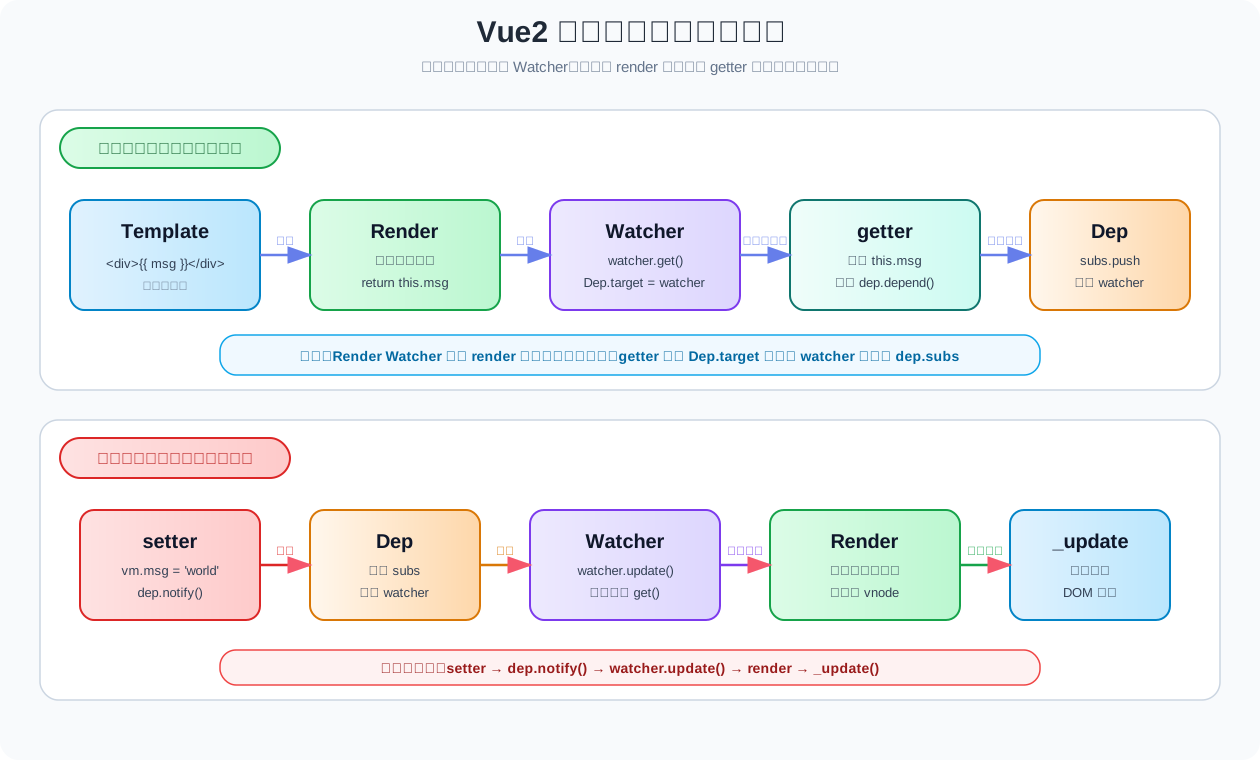
可以先记住这两条主线:
- 初始化链路:
template -> render -> watcher.get() -> getter -> dep.depend() - 更新链路:
setter -> dep.notify() -> watcher.update() -> render -> _update()
三、核心实现代码(精简版)
/* ================= Dep(依赖收集器) ================= */
class Dep {
  constructor() {
    this.subs = []
  }

  depend() {
    if (Dep.target) {
      this.subs.push(Dep.target)
    }
  }

  notify() {
    this.subs.forEach(w => w.update())
  }
}

Dep.target = null

/* ================= 响应式核心 ================= */
function defineReactive(obj, key, val) {
  const dep = new Dep()

  Object.defineProperty(obj, key, {
    get() {
      dep.depend()
      return val
    },
    set(newVal) {
      val = newVal
      dep.notify()
    }
  })
}

/* ================= Watcher ================= */
class Watcher {
  constructor(vm, exprOrFn, cb, options = {}) {
    this.vm = vm
    this.cb = cb
    this.lazy = !!options.lazy
    this.dirty = this.lazy

    // 支持函数或字符串
    if (typeof exprOrFn === 'function') {
      this.getter = exprOrFn
    } else {
      this.getter = () => vm[exprOrFn]
    }

    this.value = this.lazy ? undefined : this.get()
  }

  get() {
    Dep.target = this
    const value = this.getter.call(this.vm)
    Dep.target = null
    return value
  }

  update() {
    if (this.lazy) {
      this.dirty = true
    } else {
      const oldValue = this.value
      this.value = this.get()
      if (this.cb) {
        this.cb(this.value, oldValue)
      }
    }
  }

  evaluate() {
    this.dirty = false
    this.value = this.get()
    return this.value
  }
}

/* ================= Vue(迷你版) ================= */
class Vue {
  constructor(options) {
    this.$data = options.data
    this._watchers = []
    this._computedWatchers = {}

    // 1️⃣ 数据响应式
    Object.keys(this.$data).forEach(key => {
      defineReactive(this.$data, key, this.$data[key])

      // 代理到 this.xxx
      Object.defineProperty(this, key, {
        get: () => this.$data[key],
        set: v => (this.$data[key] = v)
      })
    })

    // 2️⃣ computed
    if (options.computed) {
      this._initComputed(options.computed)
    }

    // 3️⃣ watch
    if (options.watch) {
      this._initWatch(options.watch)
    }

    // 4️⃣ 渲染 Watcher
    this.$render = options.render
    new Watcher(this, () => {
      const vnode = this.$render?.call(this)
      this._update(vnode)
    })
  }

  _update(vnode) {
    console.log('🖥️ 更新视图:', vnode)
  }

  /* ---------- watch ---------- */
  $watch(expr, cb) {
    const watcher = new Watcher(this, expr, cb)
    this._watchers.push(watcher)
  }

  _initWatch(watch) {
    Object.keys(watch).forEach(key => {
      this.$watch(key, watch[key])
    })
  }

  /* ---------- computed ---------- */
  _initComputed(computed) {
    Object.keys(computed).forEach(key => {
      const getter = computed[key]

      const watcher = new Watcher(this, getter, null, {
        lazy: true
      })

      this._computedWatchers[key] = watcher

      Object.defineProperty(this, key, {
        get: () => {
          if (watcher.dirty) {
            watcher.evaluate()
          }
          return watcher.value
        }
      })
    })
  }
}四、模板如何转成 Render
Vue2 最终不会直接执行模板字符串,而是先把模板编译成 render 函数。 也就是说,真正参与依赖收集的不是模板本身,而是下面这个 render 函数里的取值动作。
1. 模板写法
<div>{{ msg }}</div>2. 等价的 Render 思想
function render() {
  return `<div>${this.msg}</div>`
}这里最关键的是 this.msg。 因为一旦访问它,就会触发 getter,而 getter 内部正是 Dep 收集 Watcher 的入口。
五、运行示例
结合上面的最小实现代码,可以这样模拟一次完整的初始化与更新过程:
const vm = new Vue({
  data: {
    count: 0,
    price: 10
  },

  computed: {
    total() {
      return this.count * this.price
    }
  },

  watch: {
    count(newVal, oldVal) {
      console.log('👀 watch count:', oldVal, '→', newVal)
    }
  },

  render() {
    return `count: ${this.count}, total: ${this.total}`
  }
})


setTimeout(() => {
  vm.count++
  // 👉 watch 回调触发
  // 👉 computed total 重新计算
  // 👉 视图更新
}, 1000)这个示例里,第一次会触发初始化渲染;1 秒后修改 msg,就会走一遍完整的更新链路。
六、执行流程拆解
1. 初始化阶段:Watcher 是怎么被收集进去的?
new Vue()
-> new Watcher()
-> watcher.get()
-> Dep.target = watcher
-> 执行 render()
-> 访问 this.msg
-> 触发 getter
-> dep.depend()
-> dep 收集 watcher
-> Dep.target = null
-> _update() 渲染视图这一阶段的重点是:
- 先有当前 Watcher:
watcher.get()执行前,先把Dep.target指向自己。 - 再访问响应式数据:
render()内部读取this.msg,触发getter。 - 最后完成依赖收集:
getter内部调用dep.depend(),把当前 Watcher 存入dep.subs。
所以本质上不是“模板绑定 Watcher”,而是“Render 取值时,getter 自动把当前 Watcher 收集进去”。
2. 更新阶段:数据修改后为什么能更新视图?
vm.msg = 'world'
-> 触发 setter
-> dep.notify()
-> watcher.update()
-> watcher.get()
-> 重新执行 render()
-> 再次触发 getter
-> 重新生成 vnode
-> _update() 更新视图这一阶段的重点是:
- setter 负责广播变化:属性一改,
dep.notify()就会执行。 - Watcher 负责重新渲染:收到通知后重新执行
get()。 - Render 再跑一遍:于是新的数据被读到,新的视图结果被计算出来。
七、角色分工
1. Dep 是干什么的?
- 每个响应式属性都会对应一个
Dep。 - 它本质上是一个依赖列表,内部通过
subs保存所有相关 Watcher。 - 当属性变化时,它负责统一通知这些 Watcher。
2. Watcher 是干什么的?
- Watcher 是“执行者”。
- 对于渲染场景,它负责重新执行
render,让视图拿到最新数据。 - 对于计算属性、用户
watch等场景,本质上也都是类似的观察者机制。
3. defineReactive 做了什么?
- 它通过
Object.defineProperty给属性加上getter/setter。 getter负责依赖收集。setter负责派发更新。
八、面试高频回答
1. 模板如何和 Watcher 建立关系?
答: 不是模板直接绑定 Watcher,而是模板先编译成 render 函数。Render Watcher 执行 render 时,会访问模板里用到的数据,触发这些数据的 getter,从而在 getter 里把当前 Watcher 收集到对应的 Dep 中。
2. 为什么修改数据后视图会自动更新?
答: 因为属性被 setter 劫持了。数据变化时会触发 setter,setter 再调用 dep.notify() 通知相关 Watcher。Watcher 收到通知后重新执行 render,最后调用 _update() 更新视图。
3. 一句话概括整条链路?
答: render 取值时收集依赖,setter 修改时通知依赖,watcher 再次渲染并更新视图。
九、最终总结
初始化:
模板 -> render -> watcher.get() -> getter -> dep 收集 watcher -> _update()

更新:
setter -> dep.notify() -> watcher.update() -> render -> _update()最需要记住的一句话是:
Vue2 没有“模板直接绑定 Watcher”,一切都是通过
getter劫持配合render执行时的自动依赖收集完成的。