Vuex 与 Pinia 状态管理深入对比
一、核心要点速览
💡 核心考点
- Vuex: Vue2/3 的传统状态管理方案,基于单一状态树
- Pinia: Vue3 官方推荐的新状态管理方案,更简洁的 API
- 关键差异: API 设计、TypeScript 支持、体积、性能
- 趋势: Vue3 项目优先选择 Pinia
二、基础概念
1. Vuex 简介
javascript
// Vuex 是 Vue 的官方状态管理库
// 核心概念:State、Getter、Mutation、Action、Module
import Vue from 'vue'
import Vuex from 'vuex'
Vue.use(Vuex)
const store = new Vuex.Store({
state: {
count: 0,
user: null,
todos: []
},
getters: {
doubleCount: (state) => state.count * 2,
doneTodos: (state) => state.todos.filter(t => t.done)
},
mutations: {
// 同步操作
INCREMENT(state, payload) {
state.count += payload
},
SET_USER(state, user) {
state.user = user
}
},
actions: {
// 异步操作
async fetchUser({ commit }, userId) {
const user = await api.getUser(userId)
commit('SET_USER', user)
},
incrementAsync({ commit }, amount) {
setTimeout(() => {
commit('INCREMENT', amount)
}, 1000)
}
},
modules: {
moduleA: {
state: () => ({ name: 'Module A' }),
mutations: { /* ... */ }
}
}
})
// 组件中使用
export default {
computed: {
count() {
return this.$store.state.count
},
doubleCount() {
return this.$store.getters.doubleCount
}
},
methods: {
increment() {
this.$store.commit('INCREMENT', 1)
},
fetchUser() {
this.$store.dispatch('fetchUser', 123)
}
}
}2. Pinia 简介
javascript
// Pinia 是 Vue 新一代状态管理库
// 核心概念:State、Getters、Actions(去掉了 Mutation)
import { defineStore } from 'pinia'
// 定义 Store
export const useCounterStore = defineStore('counter', {
state: () => ({
count: 0,
user: null,
todos: []
}),
getters: {
// 类似计算属性
doubleCount: (state) => state.count * 2,
// 使用 this 访问其他 getter
doubleCountPlusOne() {
return this.doubleCount + 1
},
// 带参数的 getter
getTodoById: (state) => (id) => {
return state.todos.find(t => t.id === id)
}
},
actions: {
// 同步和异步操作都放在这里
increment() {
this.count++
},
incrementBy(amount) {
this.count += amount
},
async fetchUser(userId) {
const user = await api.getUser(userId)
this.user = user
},
async incrementAsync(amount) {
setTimeout(() => {
this.incrementBy(amount)
}, 1000)
}
}
})
// 组件中使用(Composition API)
import { useCounterStore } from '@/stores/counter'
import { storeToRefs } from 'pinia'
export default {
setup() {
const counterStore = useCounterStore()
// 直接访问
const { count, user } = storeToRefs(counterStore)
const { increment, fetchUser } = counterStore
// 修改 state
counterStore.count++
counterStore.$patch({ count: counterStore.count + 1 })
counterStore.increment()
return { count, user, increment, fetchUser }
}
}
// 组件中使用(Options API)
export default {
computed: {
count() {
const counterStore = useCounterStore()
return counterStore.count
}
},
methods: {
increment() {
const counterStore = useCounterStore()
counterStore.increment()
}
}
}三、架构对比
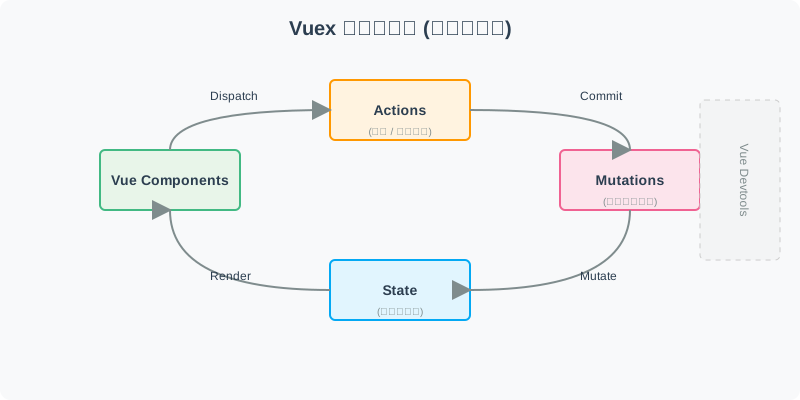
1. Vuex 架构图
┌──────────────────────────────────────────────────────────┐
│ Vuex 架构 │
└──────────────────────────────────────────────────────────┘
┌─────────────┐
│ Component │
│ (组件) │
└──────┬──────┘
│ dispatch / commit
▼
┌─────────────┐
│ Actions │ ← 异步操作
│ (动作) │ - 调用 API
│ │ - 提交 mutation
└──────┬──────┘
│ commit
▼
┌─────────────┐
│ Mutations │ ← 同步操作
│ (突变) │ - 修改 state
│ │ - 必须是同步函数
└──────┬──────┘
│ modify
▼
┌─────────────┐
│ State │ ← 单一状态树
│ (状态) │ - 应用数据
└──────┬──────┘
│ read
▼
┌─────────────┐
│ Getters │ ← 计算属性
│ (获取器) │ - 派生状态
└─────────────┘
特点:
- 单向数据流
- Mutation 必须是同步的
- Action 处理异步操作
- DevTools 可以追踪 mutation2. Pinia 架构图
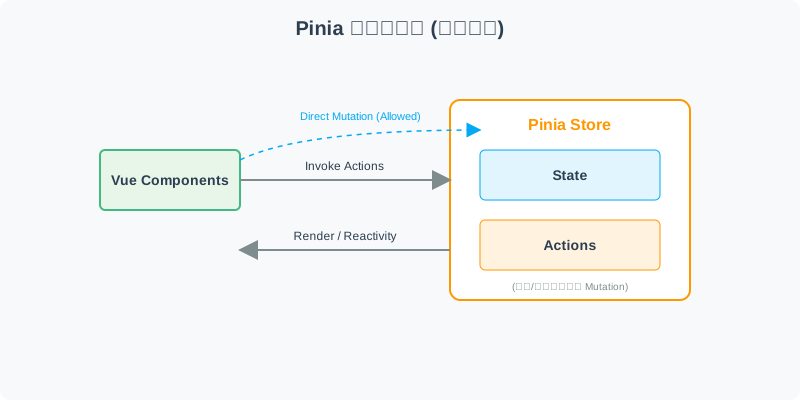
┌──────────────────────────────────────────────────────────┐
│ Pinia 架构 │
└──────────────────────────────────────────────────────────┘
┌─────────────┐
│ Component │
│ (组件) │
└──────┬──────┘
│ call / access
▼
┌─────────────┐
│ Actions │ ← 同步 + 异步操作
│ (动作) │ - 调用 API
│ │ - 修改 state
│ │ - 可以是任意函数
└──────┬──────┘
│ modify
▼
┌─────────────┐
│ State │ ← 响应式状态
│ (状态) │ - 应用数据
└──────┬──────┘
│ compute
▼
┌─────────────┐
│ Getters │ ← 计算属性
│ (获取器) │ - 派生状态
└─────────────┘
特点:
- 去掉了 Mutation
- Action 可以是同步或异步
- 更简洁的 API
- 完整的 TypeScript 支持四、详细对比表
| 特性 | Vuex | Pinia |
|---|---|---|
| 核心概念 | State、Getter、Mutation、Action、Module | State、Getter、Action |
| Mutation | ✓ 必需 | ✗ 已移除 |
| TypeScript 支持 | ⭐⭐ 较弱 | ⭐⭐⭐⭐⭐ 完整支持 |
| 体积 | ~22KB | ~1KB |
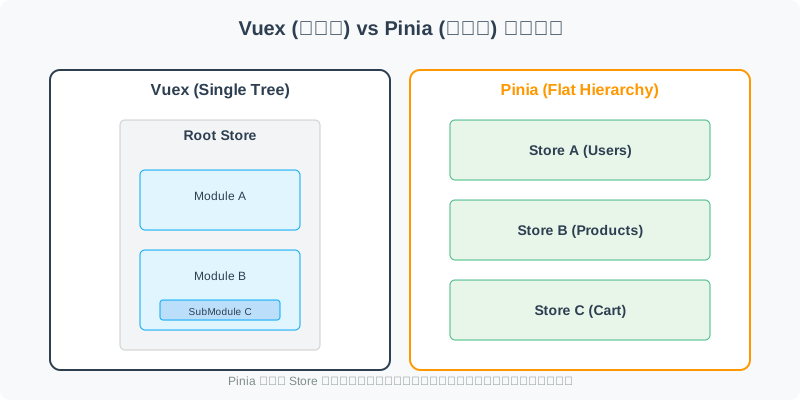
| 模块化 | Modules(嵌套) | Stores(扁平) |
| 组合式 API | ⭐⭐ 需要辅助函数 | ⭐⭐⭐⭐⭐ 原生支持 |
| 选项式 API | ⭐⭐⭐⭐⭐ 完美支持 | ⭐⭐⭐⭐ 支持良好 |
| DevTools | ✓ 支持 | ✓ 支持更好 |
| 热更新 | ✓ 支持 | ✓ 支持更好 |
| 服务端渲染 | ✓ 支持 | ✓ 支持更好 |
| 学习曲线 | 较陡峭 | 平缓 |
五、代码对比示例
1. 定义 Store
javascript
// ========== Vuex ==========
import Vuex from 'vuex'
export default new Vuex.Store({
state: {
count: 0,
user: null
},
mutations: {
SET_COUNT(state, value) {
state.count = value
},
SET_USER(state, user) {
state.user = user
}
},
actions: {
updateUser({ commit }, userData) {
commit('SET_USER', userData)
},
async fetchUser({ commit }, id) {
const res = await api.fetchUser(id)
commit('SET_USER', res.data)
}
},
getters: {
doubleCount: (state) => state.count * 2
}
})
// ========== Pinia ==========
import { defineStore } from 'pinia'
export const useUserStore = defineStore('user', {
state: () => ({
count: 0,
user: null
}),
actions: {
updateUser(userData) {
this.user = userData
},
setCount(value) {
this.count = value
},
async fetchUser(id) {
const res = await api.fetchUser(id)
this.user = res.data
}
},
getters: {
doubleCount: (state) => state.count * 2
}
})2. 组件中使用
vue
<!-- ========== Vuex ========== -->
<template>
<div>
<p>Count: {{ count }}</p>
<p>Double: {{ doubleCount }}</p>
<button @click="increment">+1</button>
</div>
</template>
<script>
import { mapState, mapGetters, mapActions } from 'vuex'
export default {
computed: {
...mapState(['count']),
...mapGetters(['doubleCount'])
},
methods: {
...mapActions(['updateUser']),
increment() {
this.$store.commit('SET_COUNT', this.count + 1)
}
}
}
</script>
<!-- ========== Pinia ========== -->
<template>
<div>
<p>Count: {{ count }}</p>
<p>Double: {{ doubleCount }}</p>
<button @click="increment">+1</button>
</div>
</template>
<script setup>
import { useUserStore } from '@/stores/user'
import { storeToRefs } from 'pinia'
const store = useUserStore()
const { count } = storeToRefs(store)
const { doubleCount } = store.getters
const { updateUser } = store
const increment = () => {
store.count++ // 直接修改
// 或 store.setCount(count.value + 1)
}
</script>3. 多 Store 组合
javascript
// ========== Vuex(模块嵌套)==========
const store = new Vuex.Store({
modules: {
user: {
state: () => ({ name: '', email: '' }),
mutations: { /* ... */ },
modules: {
posts: {
state: () => ([]),
mutations: { /* ... */ }
}
}
}
}
})
// 访问:this.$store.modules.user.posts
// ========== Pinia(扁平化 Store)==========
// stores/user.js
export const useUserStore = defineStore('user', {
state: () => ({ name: '', email: '' })
})
// stores/posts.js
export const usePostsStore = defineStore('posts', {
state: () => ([])
})
// 在 action 中组合使用
export const useUserWithPostsStore = defineStore('userWithPosts', {
actions: {
async fetchUserWithPosts(userId) {
const userStore = useUserStore()
const postsStore = usePostsStore()
const user = await api.fetchUser(userId)
const posts = await api.fetchPosts(userId)
userStore.$patch(user)
postsStore.$patch(posts)
}
}
})
// 访问:分别导入不同的 store六、优缺点分析
1. Vuex 优缺点
┌──────────────────────────────────────────────────────────┐
│ Vuex 优缺点 │
└──────────────────────────────────────────────────────────┘
优点 ✓:
━━━━━━━━━━━━━━━━━━━━━━━━━━━━━━━━━━━━━━━━━━━
┌────────────────────────────────┐
│ ✓ 成熟稳定 │
│ 经过长期验证 │
│ 社区资源丰富 │
└────────────────────────────────┘
┌────────────────────────────────┐
│ ✓ 完整的生态系统 │
│ Vuex ORM、Vuex Persist 等插件 │
│ 大量第三方库支持 │
└────────────────────────────────┘
┌────────────────────────────────┐
│ ✓ 严格的流程规范 │
│ Mutation 必须是同步 │
│ 便于调试和追踪 │
└────────────────────────────────┘
缺点 ✗:
━━━━━━━━━━━━━━━━━━━━━━━━━━━━━━━━━━━━━━━━━━━
┌────────────────────────────────┐
│ ✗ API 复杂 │
│ 需要理解 5 个核心概念 │
│ Mutation/Action 容易混淆 │
└────────────────────────────────┘
┌────────────────────────────────┐
│ ✗ TypeScript 支持差 │
│ 类型推断困难 │
│ 需要大量类型声明 │
└────────────────────────────────┘
┌────────────────────────────────┐
│ ✗ 代码冗余 │
│ 简单的操作也需要写 mutation │
│ 样板代码较多 │
└────────────────────────────────┘
┌────────────────────────────────┐
│ ✗ 模块化复杂 │
│ 嵌套模块命名空间繁琐 │
│ 模块间通信不便 │
└────────────────────────────────┘
━━━━━━━━━━━━━━━━━━━━━━━━━━━━━━━━━━━━━━━━━━━2. Pinia 优缺点
┌──────────────────────────────────────────────────────────┐
│ Pinia 优缺点 │
└──────────────────────────────────────────────────────────┘
优点 ✓:
━━━━━━━━━━━━━━━━━━━━━━━━━━━━━━━━━━━━━━━━━━━
┌────────────────────────────────┐
│ ✓ API 简洁直观 │
│ 去掉了 Mutation │
│ 更符合直觉 │
└────────────────────────────────┘
┌────────────────────────────────┐
│ ✓ 完整的 TypeScript 支持 │
│ 无需额外配置 │
│ 类型推断完美 │
└────────────────────────────────┘
┌────────────────────────────────┐
│ ✓ 体积小巧 │
│ 仅 1KB(gzip) │
│ 比 Vuex 轻 95% │
└────────────────────────────────┘
┌────────────────────────────────┐
│ ✓ 更好的组合性 │
│ 扁平化的 store 设计 │
│ 易于跨 store 调用 │
└────────────────────────────────┘
┌────────────────────────────────┐
│ ✓ Vue 3 完美集成 │
│ Composition API 友好 │
│ Options API 也支持 │
└────────────────────────────────┘
缺点 ✗:
━━━━━━━━━━━━━━━━━━━━━━━━━━━━━━━━━━━━━━━━━━━
┌────────────────────────────────┐
│ ✗ 相对较新 │
│ 社区资源不如 Vuex 丰富 │
│ 最佳实践还在演进中 │
└────────────────────────────────┘
┌────────────────────────────────┐
│ ✗ 生态待完善 │
│ 插件相对较少 │
│ 但核心功能已足够 │
└────────────────────────────────┘
┌────────────────────────────────┐
│ ✗ 迁移成本 │
│ 老项目迁移需要时间 │
│ 团队需要学习新知识 │
└────────────────────────────────┘
━━━━━━━━━━━━━━━━━━━━━━━━━━━━━━━━━━━━━━━━━━━七、使用场景决策
1. 选择指南
项目需求分析:
━━━━━━━━━━━━━━━━━━━━━━━━━━━━━━━━━━━━━━━━━━━
新项目?
│
├─ 是 → 使用 Vue 3?
│ │
│ ├─ 是 → 选择 Pinia ✓
│ │ └─ 官方推荐,TypeScript 友好
│ │
│ └─ 否 → Vue 2 项目
│ └─ 选择 Vuex ✓
│
└─ 否 → 已有项目?
│
├─ 是 → 使用 Vuex?
│ │
│ ├─ 是 → 继续使用 Vuex
│ │ └─ 除非有必要,否则不迁移
│ │
│ └─ 否 → 考虑迁移到 Pinia
│ └─ 评估成本和收益
│
└─ 其他框架?
│
├─ React → Redux / Zustand
│
└─ Angular → NgRx / Akita
━━━━━━━━━━━━━━━━━━━━━━━━━━━━━━━━━━━━━━━━━━━2. 迁移策略
javascript
// 从 Vuex 迁移到 Pinia 的步骤
// Step 1: 安装 Pinia
npm install pinia
// Step 2: 配置 Pinia
import { createPinia } from 'pinia'
const pinia = createPinia()
app.use(pinia)
// Step 3: 逐步迁移 Store
// 旧:Vuex module
// store/modules/user.js
export default {
namespaced: true,
state: () => ({ user: null }),
mutations: { SET_USER(state, user) { /* ... */ } },
actions: { async fetchUser({ commit }, id) { /* ... */ } }
}
// 新:Pinia store
// stores/user.js
export const useUserStore = defineStore('user', {
state: () => ({ user: null }),
actions: {
async fetchUser(id) {
const res = await api.fetchUser(id)
this.user = res.data
}
}
})
// Step 4: 更新组件引用
// 旧:this.$store.dispatch('user/fetchUser', id)
// 新:const userStore = useUserStore(); await userStore.fetchUser(id)
// Step 5: 并行运行(可选)
// Vuex 和 Pinia 可以同时存在,逐步迁移八、面试标准回答
Vuex 和 Pinia 都是 Vue 的官方状态管理库,用于管理应用的共享状态。
Vuex 是传统的状态管理方案,包含 State、Getter、Mutation、Action、Module 五个核心概念。它采用严格的单向数据流,Mutation 必须是同步的,Action 处理异步操作。这种设计虽然规范,但 API 较为复杂,代码冗余较多。
Pinia 是 Vue3 时代推出的新一代状态管理方案,主要改进包括:
- 去掉了 Mutation,只保留 State、Getter、Action,简化了 API
- 更好的 TypeScript 支持,无需额外配置即可获得完整的类型推断
- 更小的体积,仅 1KB,比 Vuex 轻 95%
- 更灵活的组合性,支持多个 store 的扁平化管理,易于跨 store 调用
- 对 Composition API 的完美支持,同时兼容 Options API
主要区别:
- 复杂度:Vuex 需要理解 5 个概念,Pinia 只需 3 个
- 代码量:Pinia 通常比 Vuex 少 30%-50% 的代码
- TS 支持:Pinia 提供完整的类型推断,Vuex 较弱
- 体积:Pinia 1KB vs Vuex 22KB
- 学习曲线:Pinia 更平缓,更容易上手
实际项目中,我的建议是:
- Vue3 新项目:优先选择 Pinia,官方推荐
- Vue2 老项目:继续使用 Vuex,稳定为主
- 迁移场景:评估成本后逐步迁移,不必一刀切
发展趋势来看,Pinia 已经成为 Vue3 的默认推荐,未来会有更多的生态支持和最佳实践涌现。
九、延伸思考
1. 为什么去掉 Mutation?
Mutation 的设计初衷:
━━━━━━━━━━━━━━━━━━━━━━━━━━━━━━━━━━━━━━━━━━━
问题:
在早期版本中,没有 Mutation 时:
- Action 可以直接修改 state
- 无法区分同步和异步操作
- DevTools 难以追踪变化
解决方案:
引入 Mutation,规定:
- 只有 Mutation 能修改 state
- Mutation 必须是同步的
- Action 只能 commit mutation
好处:
✓ 每次 state 变化都可追踪
✓ 便于调试和时间旅行
✓ 明确的数据流向
━━━━━━━━━━━━━━━━━━━━━━━━━━━━━━━━━━━━━━━━━━━
为什么 Pinia 要去掉 Mutation?
━━━━━━━━━━━━━━━━━━━━━━━━━━━━━━━━━━━━━━━━━━━
原因:
1. 现代 DevTools 已经足够强大
- 可以直接追踪 action 中的 state 变化
- 不再需要同步限制
2. 增加了不必要的复杂性
- 简单的操作也要写 mutation
- 代码量翻倍
3. TypeScript 支持困难
- mutation 的类型推断复杂
- 增加开发成本
4. 社区反馈
- 很多开发者认为这是过度设计
- MobX、Zustand 等库都没有 mutation
替代方案:
Pinia 通过响应式系统直接追踪 action 中的
state 变化,DevTools 依然可以完整记录
━━━━━━━━━━━━━━━━━━━━━━━━━━━━━━━━━━━━━━━━━━━2. 状态管理的演进趋势
状态管理发展历程:
━━━━━━━━━━━━━━━━━━━━━━━━━━━━━━━━━━━━━━━━━━━
阶段 1: 事件驱动 (jQuery 时代)
- 直接操作 DOM
- 全局变量存储状态
- 难以维护
阶段 2: MVC/MVVM (Backbone, Knockout)
- Model 存储数据
- View 自动更新
- 双向绑定
阶段 3: Flux/Redux (React 时代)
- 单向数据流
- 不可变数据
- 纯函数 reducer
阶段 4: 响应式 (Vue, MobX)
- 响应式依赖追踪
- 可变数据
- 更直观的 API
阶段 5: 原子化 (Recoil, Jotai, Zustand)
- 细粒度状态
- 按需订阅
- 极简 API
现代趋势:
✓ 更少的样板代码
✓ 更好的类型支持
✓ 更细的粒度控制
✓ 更佳的开发体验
━━━━━━━━━━━━━━━━━━━━━━━━━━━━━━━━━━━━━━━━━━━
Pinia 的定位:
┌────────────────────────────────┐
│ 结合了 Redux 的架构思想 │
│ 和 MobX 的响应式体验 │
│ │
│ 保持了良好的可预测性 │
│ 同时提供了简洁的 API │
│ │
│ 是 Vue 生态的理想选择 │
└────────────────────────────────┘十、记忆口诀
状态管理歌诀:
Vuex 是老将,
五个概念要记牢。
Mutation 必须同步,
Action 异步来处理。
Pinia 是新秀,
三个概念更简单。
去掉 mutation,
TypeScript 支持好。
两者对比要清楚:
API 复杂度不同,
体积差异很明显,
Vue3 首选是 Pinia!
项目选择有策略:
新项目用 Pinia,
老项目继续 Vuex,
迁移不要急于一时!十一、推荐资源
十二、总结一句话
- Vuex: 经典五件套 + 严格流程 = 成熟但复杂 🏛️
- Pinia: 精简三件套 + TS 友好 = 现代且高效 ⚡
- 选择建议: Vue3 + Pinia = 黄金搭档 ✓