
JavaScript 设计模式面试题全解析
一、核心要点速览
💡 核心考点
- 三大分类: 创建型、结构型、行为型
- 高频模式: 单例、观察者、发布订阅、工厂、代理、策略
- 实际应用: Vue/React 框架中的设计模式应用
- 设计原则: SOLID、DRY、KISS、YAGNI
二、设计模式分类总览
1. 三大类型体系
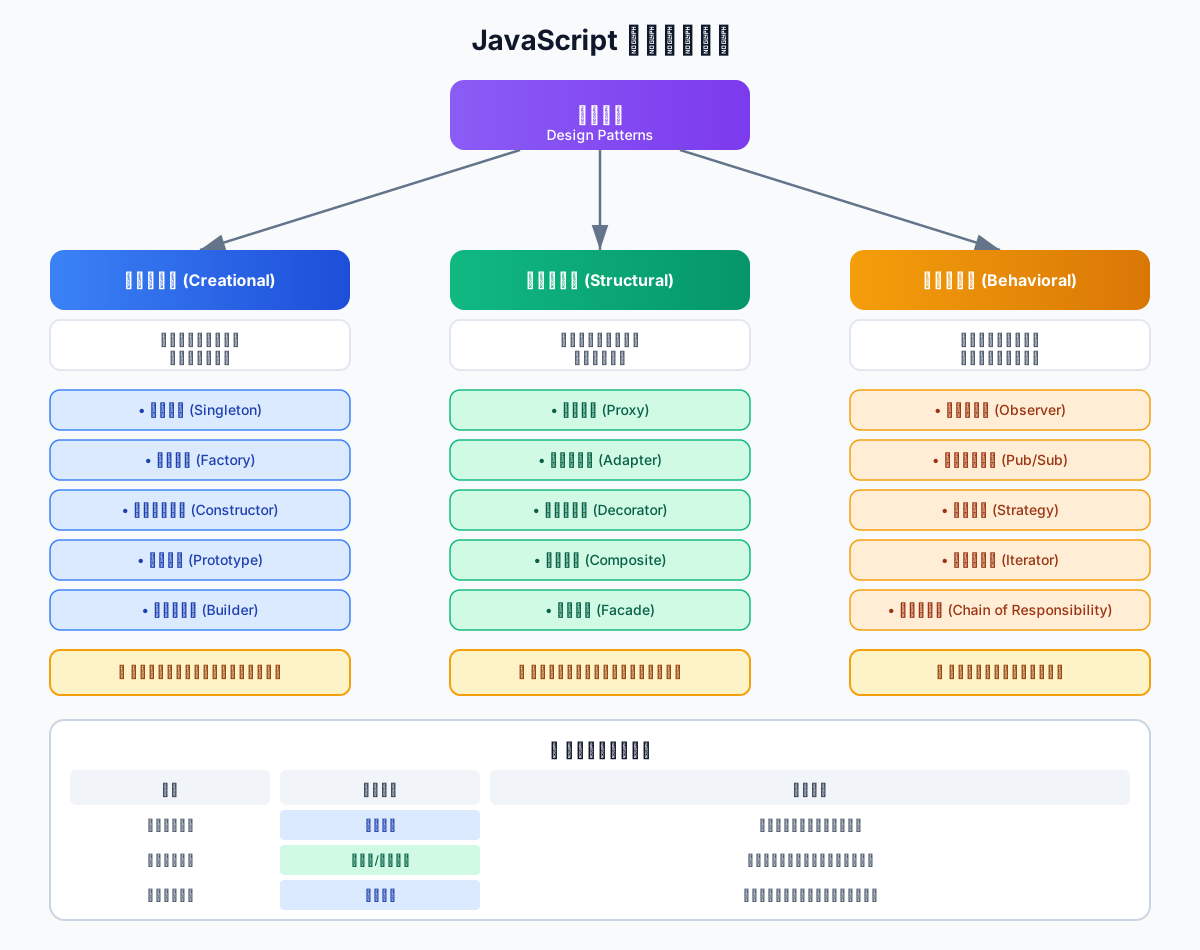
创建型模式 (Creational):关注对象的创建过程,隐藏实例化逻辑
- 单例模式、工厂模式、构造函数模式、原型模式、建造者模式
结构型模式 (Structural):关注类和对象的组合,简化结构设计
- 代理模式、适配器模式、装饰器模式、组合模式、外观模式
行为型模式 (Behavioral):关注对象之间的通信和职责分配
- 观察者模式、发布订阅模式、策略模式、迭代器模式、责任链模式
2. 设计模式选择指南
| 场景 | 推荐模式 | 解决问题 |
|---|---|---|
| 全局唯一实例 | 单例模式 | 避免重复创建 |
| 对象解耦通知 | 观察者/发布订阅 | 一对多依赖关系 |
| 复杂对象创建 | 工厂模式 | 封装创建逻辑 |
| 访问控制/增强 | 代理模式 | 拦截和增强功能 |
| 算法可替换 | 策略模式 | 消除条件分支 |
| 接口不兼容 | 适配器模式 | 转换接口格式 |
| 动态添加功能 | 装饰器模式 | 避免继承爆炸 |
三、创建型模式
1. 单例模式 (Singleton)
核心思想:保证一个类只有一个实例,并提供全局访问点。
最小实现
javascript
// ES6 Class 实现
class Singleton {
  constructor(name) {
    // 防止多次实例化
    if (Singleton.instance) {
      return Singleton.instance
    }

    this.name = name
    Singleton.instance = this
    return this
  }

  getName() {
    return this.name
  }
}

// 测试
const s1 = new Singleton('Alice')
const s2 = new Singleton('Bob')

console.log(s1 === s2)        // true
console.log(s1.getName()) // 'Alice'(第一次创建的实例)闭包实现(更优雅)
javascript
const createSingleton = (() => {
  let instance = null

  return function(name) {
    if (!instance) {
      instance = {
        name,
        getName() {
          return this.name
        }
      }
    }
    return instance
  }
})()

// 使用
const s1 = createSingleton('Vue')
const s2 = createSingleton('React')

console.log(s1 === s2)  // true
console.log(s1.name) // 'Vue'实际应用场景
javascript
// ✓ 场景 1: 全局状态管理(Vuex/Pinia 核心)
class Store {
  constructor() {
    if (Store.instance) {
      return Store.instance
    }

    this.state = {}
    this.mutations = {}
    Store.instance = this
  }

  commit(type, payload) {
    if (this.mutations[type]) {
      this.mutations[type](this.state, payload)
    }
  }
}

const store = new Store()


// ✓ 场景 2: 日志管理器
class Logger {
  constructor() {
    if (Logger.instance) {
      return Logger.instance
    }

    this.logs = []
    Logger.instance = this
  }

  log(message) {
    this.logs.push({
      timestamp: Date.now(),
      message
    })
    console.log(`[LOG] ${message}`)
  }

  getLogs() {
    return this.logs
  }
}

const logger = new Logger()
logger.log('应用启动')
logger.log('用户登录')


// ✓ 场景 3: WebSocket 连接管理
class WebSocketManager {
  constructor(url) {
    if (WebSocketManager.instance) {
      return WebSocketManager.instance
    }

    this.ws = new WebSocket(url)
    this.listeners = []
    WebSocketManager.instance = this
  }

  send(data) {
    this.ws.send(JSON.stringify(data))
  }

  onMessage(callback) {
    this.listeners.push(callback)
    this.ws.onmessage = (event) => {
      const data = JSON.parse(event.data)
      this.listeners.forEach(cb => cb(data))
    }
  }
}2. 工厂模式 (Factory)
核心思想:定义一个创建对象的接口,让子类决定实例化哪个类。
简单工厂
javascript
// 产品类
class Button {
  render() {
    return '<button>按钮</button>'
  }
}

class Input {
  render() {
    return '<input type="text" />'
  }
}

class Select {
  render() {
    return '<select><option>选项</option></select>'
  }
}

// 工厂函数
function createComponent(type) {
  switch (type) {
    case 'button':
      return new Button()
    case 'input':
      return new Input()
    case 'select':
      return new Select()
    default:
      throw new Error(`未知组件类型: ${type}`)
  }
}

// 使用
const button = createComponent('button')
console.log(button.render()) // '<button>按钮</button>'工厂方法模式
javascript
// 抽象工厂类
class ComponentFactory {
  createComponent() {
    throw new Error('子类必须实现此方法')
  }

  render() {
    const component = this.createComponent()
    return component.render()
  }
}

// 具体工厂
class ButtonFactory extends ComponentFactory {
  createComponent() {
    return new Button()
  }
}

class InputFactory extends ComponentFactory {
  createComponent() {
    return new Input()
  }
}

// 使用
const buttonFactory = new ButtonFactory()
console.log(buttonFactory.render())  // '<button>按钮</button>'

const inputFactory = new InputFactory()
console.log(inputFactory.render()) // '<input type="text" />'实际应用场景
javascript
// ✓ 场景 1: HTTP 请求工厂
class HttpRequestFactory {
  static create(method, url, options = {}) {
    const config = {
      method: method.toUpperCase(),
      url,
      headers: { 'Content-Type': 'application/json' },
      ...options
    }

    switch (config.method) {
      case 'GET':
        return new GETRequest(config)
      case 'POST':
        return new POSTRequest(config)
      case 'PUT':
        return new PUTRequest(config)
      case 'DELETE':
        return new DELETERequest(config)
      default:
        throw new Error(`不支持的 HTTP 方法: ${config.method}`)
    }
  }
}

class GETRequest {
  constructor(config) {
    this.config = config
  }

  async execute() {
    const response = await fetch(this.config.url, {
      method: 'GET',
      headers: this.config.headers
    })
    return response.json()
  }
}

class POSTRequest {
  constructor(config) {
    this.config = config
  }

  async execute() {
    const response = await fetch(this.config.url, {
      method: 'POST',
      headers: this.config.headers,
      body: JSON.stringify(this.config.data)
    })
    return response.json()
  }
}

// 使用
const request = HttpRequestFactory.create('POST', '/api/users', {
  data: { name: 'Vue', age: 3 }
})
request.execute()


// ✓ 场景 2: 表单验证器工厂
class ValidatorFactory {
  static create(type, rule) {
    switch (type) {
      case 'required':
        return new RequiredValidator(rule)
      case 'email':
        return new EmailValidator(rule)
      case 'minLength':
        return new MinLengthValidator(rule)
      case 'pattern':
        return new PatternValidator(rule)
      default:
        throw new Error(`未知验证器类型: ${type}`)
    }
  }
}

class RequiredValidator {
  validate(value) {
    return value ? { valid: true } : { valid: false, message: '必填项' }
  }
}

class EmailValidator {
  validate(value) {
    const emailRegex = /^[^\s@]+@[^\s@]+\.[^\s@]+$/
    return emailRegex.test(value)
      ? { valid: true }
      : { valid: false, message: '邮箱格式错误' }
  }
}四、行为型模式
1. 观察者模式 (Observer)
核心思想:定义对象间的一对多依赖关系,当一个对象状态改变时,所有依赖者都会收到通知。
最小实现
javascript
class Subject {
  constructor() {
    this.observers = []
  }

  // 订阅
  subscribe(observer) {
    this.observers.push(observer)
  }

  // 取消订阅
  unsubscribe(observer) {
    this.observers = this.observers.filter(obs => obs !== observer)
  }

  // 通知所有观察者
  notify(data) {
    this.observers.forEach(observer => observer.update(data))
  }
}

class Observer {
  constructor(name) {
    this.name = name
  }

  update(data) {
    console.log(`${this.name} 收到通知:`, data)
  }
}

// 使用
const subject = new Subject()

const observer1 = new Observer('观察者1')
const observer2 = new Observer('观察者2')

subject.subscribe(observer1)
subject.subscribe(observer2)

subject.notify('状态改变')
// 输出:
// 观察者1 收到通知: 状态改变
// 观察者2 收到通知: 状态改变

subject.unsubscribe(observer1)
subject.notify('再次改变')
// 输出: 观察者2 收到通知: 再次改变Vue 响应式原理中的应用
javascript
// Vue 2 响应式系统简化版
class Dep {
  constructor() {
    this.subs = []
  }

  // 收集依赖
  depend() {
    if (Dep.target && !this.subs.includes(Dep.target)) {
      this.subs.push(Dep.target)
    }
  }

  // 通知更新
  notify() {
    this.subs.forEach(sub => sub.update())
  }
}

class Watcher {
  constructor(vm, key, callback) {
    this.vm = vm
    this.key = key
    this.callback = callback
    this.value = this.get()
  }

  get() {
    Dep.target = this
    const value = this.vm[this.key]
    Dep.target = null
    return value
  }

  update() {
    const newValue = this.vm[this.key]
    if (newValue !== this.value) {
      this.value = newValue
      this.callback(newValue)
    }
  }
}

// 模拟 Vue 实例
const vm = {
  message: 'Hello',
  _dep: new Dep()
}

// 劫持属性
Object.defineProperty(vm, 'message', {
  get() {
    this._dep.depend()
    return this._message
  },
  set(newVal) {
    this._message = newVal
    this._dep.notify()
  }
})

vm._message = 'Hello'

// 创建观察者
new Watcher(vm, 'message', (newVal) => {
  console.log('视图更新:', newVal)
})

vm.message = 'World' // 触发更新: 视图更新: World2. 发布订阅模式 (Pub/Sub)
核心思想:通过事件中心解耦发布者和订阅者,两者互不认识。
与观察者模式的区别
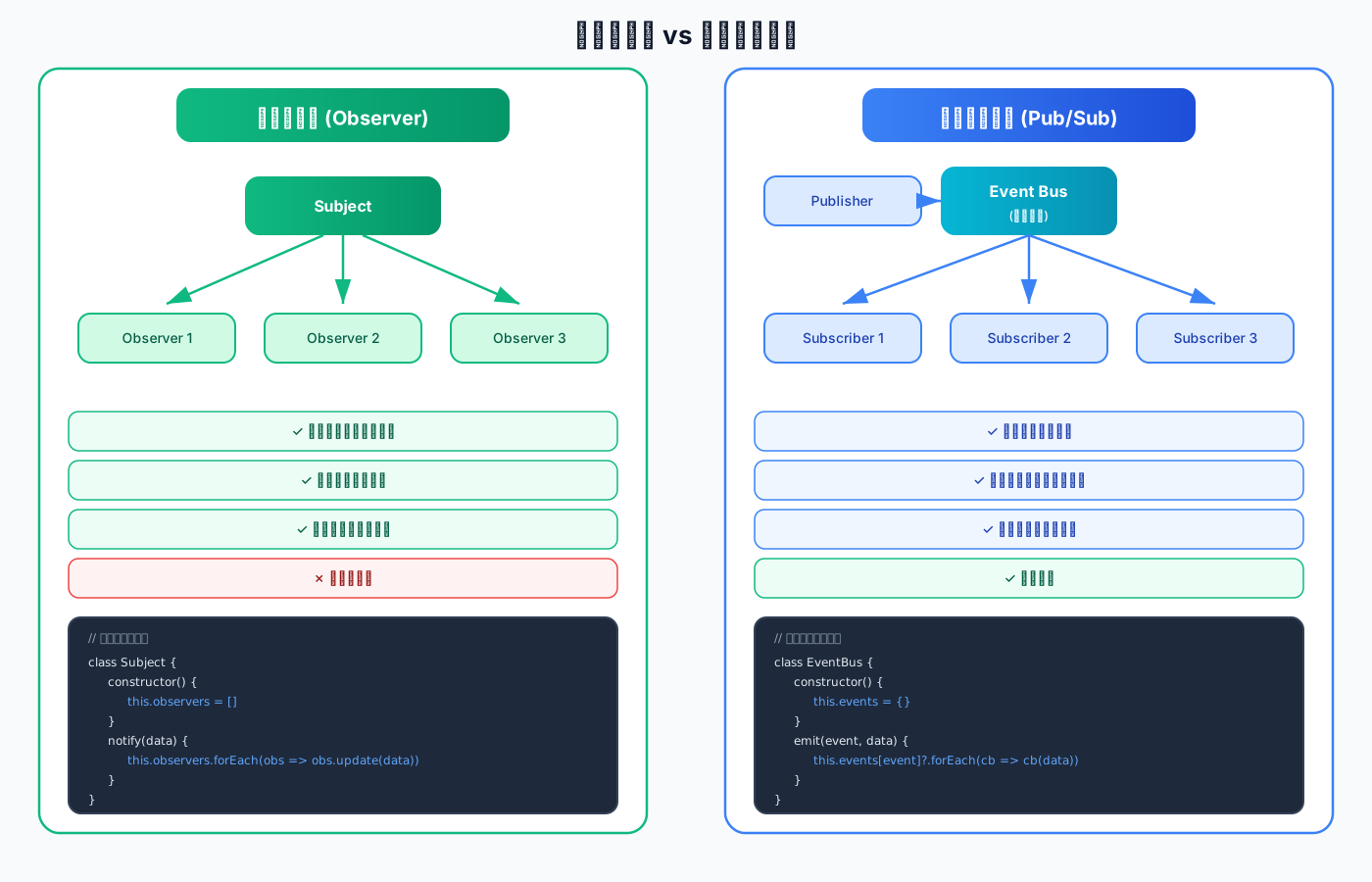
关键区别总结:
| 维度 | 观察者模式 | 发布订阅模式 |
|---|---|---|
| 耦合度 | 紧耦合(直接通知) | 松耦合(通过事件总线) |
| 中介 | 无 | 有事件总线(Event Bus) |
| 灵活性 | 较低 | 较高 |
| 性能 | 较高(少一层中转) | 稍低(多一层中转) |
| 适用场景 | 紧密关联的对象 | 松散耦合的组件 |
最小实现
javascript
class EventBus {
  constructor() {
    this.events = {}
  }

  // 订阅事件
  on(event, callback) {
    if (!this.events[event]) {
      this.events[event] = []
    }
    this.events[event].push(callback)

    // 返回取消订阅函数
    return () => this.off(event, callback)
  }

  // 一次性订阅
  once(event, callback) {
    const wrapper = (...args) => {
      callback(...args)
      this.off(event, wrapper)
    }
    return this.on(event, wrapper)
  }

  // 发布事件
  emit(event, ...args) {
    if (this.events[event]) {
      this.events[event].forEach(callback => {
        try {
          callback(...args)
        } catch (error) {
          console.error(`事件 ${event} 回调执行失败:`, error)
        }
      })
    }
  }

  // 取消订阅
  off(event, callback) {
    if (this.events[event]) {
      if (callback) {
        this.events[event] = this.events[event].filter(cb => cb !== callback)
      } else {
        delete this.events[event]
      }
    }
  }
}

// 使用
const bus = new EventBus()

// 订阅
const unsubscribe = bus.on('user:login', (user) => {
  console.log(`用户 ${user.name} 登录`)
})

bus.on('user:logout', (user) => {
  console.log(`用户 ${user.name} 登出`)
})

// 发布
bus.emit('user:login', { name: 'Vue' })
// 输出: 用户 Vue 登录

// 取消订阅
unsubscribe()
bus.emit('user:login', { name: 'React' })
// 不会输出(已取消订阅)实际应用场景
javascript
// ✓ 场景 1: 组件通信(Vue/React 事件总线)
class ComponentEventBus {
  constructor() {
    this.bus = new EventBus()
  }

  // 组件 A 发送消息
  sendMessage(channel, data) {
    this.bus.emit(channel, data)
  }

  // 组件 B 接收消息
  receiveMessage(channel, handler) {
    return this.bus.on(channel, handler)
  }
}

// 使用
const eventBus = new ComponentEventBus()

// 组件 A
eventBus.sendMessage('cart:update', { productId: 123, quantity: 2 })

// 组件 B
eventBus.receiveMessage('cart:update', (data) => {
  console.log('购物车更新:', data)
})


// ✓ 场景 2: 任务调度系统
class TaskScheduler {
  constructor() {
    this.bus = new EventBus()
  }

  // 注册任务
  registerTask(taskName, handler) {
    return this.bus.on(`task:${taskName}`, handler)
  }

  // 触发任务
  triggerTask(taskName, data) {
    console.log(`触发任务: ${taskName}`)
    this.bus.emit(`task:${taskName}`, data)
  }

  // 任务完成后通知
  onTaskComplete(taskName, callback) {
    return this.bus.on(`task:${taskName}:complete`, callback)
  }
}

// 使用
const scheduler = new TaskScheduler()

// 注册数据处理任务
scheduler.registerTask('data-process', (data) => {
  console.log('处理数据:', data)
  // 模拟异步处理
  setTimeout(() => {
    scheduler.bus.emit('task:data-process:complete', { result: 'success' })
  }, 1000)
})

// 监听任务完成
scheduler.onTaskComplete('data-process', (result) => {
  console.log('任务完成:', result)
})

// 触发任务
scheduler.triggerTask('data-process', { source: 'API' })3. 策略模式 (Strategy)
核心思想:定义一系列算法,将每个算法封装起来,并使它们可以互换。
最小实现
javascript
// 策略类
class DiscountStrategy {
  calculate(price) {
    throw new Error('子类必须实现此方法')
  }
}

class NoDiscount extends DiscountStrategy {
  calculate(price) {
    return price
  }
}

class PercentageDiscount extends DiscountStrategy {
  constructor(percentage) {
    super()
    this.percentage = percentage
  }

  calculate(price) {
    return price * (1 - this.percentage)
  }
}

class FixedDiscount extends DiscountStrategy {
  constructor(amount) {
    super()
    this.amount = amount
  }

  calculate(price) {
    return Math.max(0, price - this.amount)
  }
}

// 上下文类
class PriceCalculator {
  constructor(strategy) {
    this.strategy = strategy
  }

  // 切换策略
  setStrategy(strategy) {
    this.strategy = strategy
  }

  // 计算价格
  calculatePrice(price) {
    return this.strategy.calculate(price)
  }
}

// 使用
const calculator = new PriceCalculator(new NoDiscount())
console.log(calculator.calculatePrice(100))  // 100

calculator.setStrategy(new PercentageDiscount(0.2))
console.log(calculator.calculatePrice(100))  // 80

calculator.setStrategy(new FixedDiscount(15))
console.log(calculator.calculatePrice(100)) // 85实际应用场景
javascript
// ✓ 场景 1: 表单验证策略
const validationStrategies = {
  required: (value) => {
    return value ? null : '此项为必填项'
  },
  email: (value) => {
    const pattern = /^[^\s@]+@[^\s@]+\.[^\s@]+$/
    return pattern.test(value) ? null : '邮箱格式不正确'
  },
  minLength: (value, min) => {
    return value.length >= min ? null : `最少需要${min}个字符`
  },
  maxLength: (value, max) => {
    return value.length <= max ? null : `最多允许${max}个字符`
  },
  pattern: (value, regex) => {
    return regex.test(value) ? null : '格式不符合要求'
  }
}

class FormValidator {
  constructor() {
    this.rules = {}
  }

  // 添加验证规则
  addRule(field, strategy, ...params) {
    if (!this.rules[field]) {
      this.rules[field] = []
    }
    this.rules[field].push({ strategy, params })
  }

  // 验证字段
  validateField(field, value) {
    const rules = this.rules[field]
    if (!rules) return null

    for (const { strategy, params } of rules) {
      const error = validationStrategies[strategy](value, ...params)
      if (error) return error
    }
    return null
  }

  // 验证整个表单
  validate(formData) {
    const errors = {}

    for (const field in this.rules) {
      const error = this.validateField(field, formData[field])
      if (error) {
        errors[field] = error
      }
    }

    return Object.keys(errors).length === 0 ? null : errors
  }
}

// 使用
const validator = new FormValidator()
validator.addRule('username', 'required')
validator.addRule('username', 'minLength', 3)
validator.addRule('email', 'required')
validator.addRule('email', 'email')

const errors = validator.validate({
  username: 'ab',
  email: 'invalid-email'
})

console.log(errors)
// { username: '最少需要3个字符', email: '邮箱格式不正确' }


// ✓ 场景 2: 支付策略
const paymentStrategies = {
  alipay: {
    pay(amount) {
      console.log(`使用支付宝支付 ¥${amount}`)
      return { success: true, method: 'alipay' }
    }
  },
  wechat: {
    pay(amount) {
      console.log(`使用微信支付 ¥${amount}`)
      return { success: true, method: 'wechat' }
    }
  },
  creditCard: {
    pay(amount) {
      console.log(`使用信用卡支付 ¥${amount}`)
      return { success: true, method: 'creditCard' }
    }
  }
}

class PaymentProcessor {
  constructor() {
    this.strategy = null
  }

  setStrategy(method) {
    this.strategy = paymentStrategies[method]
    if (!this.strategy) {
      throw new Error(`不支持的支付方式: ${method}`)
    }
  }

  process(amount) {
    if (!this.strategy) {
      throw new Error('未设置支付方式')
    }
    return this.strategy.pay(amount)
  }
}

// 使用
const processor = new PaymentProcessor()
processor.setStrategy('alipay')
processor.process(100)  // 使用支付宝支付 ¥100

processor.setStrategy('wechat')
processor.process(200) // 使用微信支付 ¥200五、结构型模式
1. 代理模式 (Proxy)
核心思想:为其他对象提供一种代理以控制对这个对象的访问。
最小实现
javascript
// 目标对象
const target = {
  name: 'Vue',
  age: 3
}

// 代理对象
const handler = {
  get(target, property) {
    console.log(`访问属性: ${property}`)
    return Reflect.get(target, property)
  },

  set(target, property, value) {
    console.log(`设置属性: ${property} = ${value}`)
    return Reflect.set(target, property, value)
  }
}

const proxy = new Proxy(target, handler)

// 使用
proxy.name        // 访问属性: name → 'Vue'
proxy.age = 4 // 设置属性: age = 4实际应用场景
javascript
// ✓ 场景 1: 数据验证代理
function createValidatedObject(obj, validators) {
  return new Proxy(obj, {
    set(target, property, value) {
      const validator = validators[property]

      if (validator) {
        const error = validator(value)
        if (error) {
          throw new Error(`属性 ${property} 验证失败: ${error}`)
        }
      }

      return Reflect.set(target, property, value)
    }
  })
}

// 使用
const user = createValidatedObject(
  { name: '', age: 0 },
  {
    name: (value) => {
      if (!value || value.length < 2) {
        return '姓名至少2个字符'
      }
      return null
    },
    age: (value) => {
      if (!Number.isInteger(value) || value < 0 || value > 150) {
        return '年龄必须是0-150的整数'
      }
      return null
    }
  }
)

user.name = 'Vue'      // ✓ 成功
user.age = 3           // ✓ 成功
user.name = 'V'        // ✗ 抛出错误: 姓名至少2个字符


// ✓ 场景 2: 缓存代理
function createCachedFunction(fn) {
  const cache = new Map()

  return new Proxy(fn, {
    apply(target, thisArg, args) {
      const key = JSON.stringify(args)

      if (cache.has(key)) {
        console.log('从缓存读取')
        return cache.get(key)
      }

      const result = target.apply(thisArg, args)
      cache.set(key, result)
      console.log('计算并缓存')
      return result
    }
  })
}

// 使用
const expensiveCalculation = (n) => {
  console.log('执行耗时计算...')
  return n * n
}

const cachedCalc = createCachedFunction(expensiveCalculation)

cachedCalc(5)   // 执行耗时计算... → 25
cachedCalc(5)   // 从缓存读取 → 25
cachedCalc(10)  // 执行耗时计算... → 100


// ✓ 场景 3: API 请求代理
function createApiProxy(baseUrl) {
  return new Proxy({}, {
    get(target, property) {
      return async (...args) => {
        const url = `${baseUrl}/${property}`
        const [params] = args

        console.log(`发起请求: ${url}`, params)

        try {
          const response = await fetch(url, {
            method: params?.method || 'GET',
            headers: { 'Content-Type': 'application/json' },
            body: params?.body ? JSON.stringify(params.body) : undefined
          })

          if (!response.ok) {
            throw new Error(`HTTP ${response.status}`)
          }

          return await response.json()
        } catch (error) {
          console.error(`请求失败: ${url}`, error)
          throw error
        }
      }
    }
  })
}

// 使用
const api = createApiProxy('/api')

// 自动转换为 API 调用
api.users()                    // GET /api/users
api.users({ id: 123 })         // GET /api/users?id=123
api.posts({                    // POST /api/posts
  method: 'POST',
  body: { title: 'Hello' }
})2. 装饰器模式 (Decorator)
核心思想:在不改变原对象的基础上,动态地给对象添加新的功能。
最小实现
javascript
// 基础类
class Coffee {
  cost() {
    return 10
  }

  description() {
    return '普通咖啡'
  }
}

// 装饰器基类
class CoffeeDecorator {
  constructor(coffee) {
    this.coffee = coffee
  }

  cost() {
    return this.coffee.cost()
  }

  description() {
    return this.coffee.description()
  }
}

// 具体装饰器
class MilkDecorator extends CoffeeDecorator {
  cost() {
    return super.cost() + 5
  }

  description() {
    return super.description() + ' + 牛奶'
  }
}

class SugarDecorator extends CoffeeDecorator {
  cost() {
    return super.cost() + 2
  }

  description() {
    return super.description() + ' + 糖'
  }
}

// 使用
let coffee = new Coffee()
console.log(coffee.description())  // '普通咖啡'
console.log(coffee.cost())         // 10

coffee = new MilkDecorator(coffee)
console.log(coffee.description())  // '普通咖啡 + 牛奶'
console.log(coffee.cost())         // 15

coffee = new SugarDecorator(coffee)
console.log(coffee.description())  // '普通咖啡 + 牛奶 + 糖'
console.log(coffee.cost()) // 17函数装饰器
javascript
// 日志装饰器
function withLogging(fn) {
  return function(...args) {
    console.log(`调用 ${fn.name},参数:`, args)
    const result = fn.apply(this, args)
    console.log(`${fn.name} 返回:`, result)
    return result
  }
}

// 性能监控装饰器
function withPerformance(fn) {
  return function(...args) {
    const start = performance.now()
    const result = fn.apply(this, args)
    const end = performance.now()
    console.log(`${fn.name} 执行时间: ${(end - start).toFixed(2)}ms`)
    return result
  }
}

// 错误处理装饰器
function withErrorHandling(fn) {
  return function(...args) {
    try {
      return fn.apply(this, args)
    } catch (error) {
      console.error(`${fn.name} 执行出错:`, error)
      return null
    }
  }
}

// 使用
function add(a, b) {
  return a + b
}

const loggedAdd = withLogging(add)
loggedAdd(2, 3)
// 输出:
// 调用 add,参数: [2, 3]
// add 返回: 5

const perfAdd = withPerformance(add)
perfAdd(2, 3)
// 输出: add 执行时间: 0.05ms

const safeAdd = withErrorHandling(add)
safeAdd(2, 3)  // 5
safeAdd('2', null) // 不会抛出错误,返回 null六、设计原则
1. SOLID 原则
┌──────────────────────────────────────────────────────────┐
│                  SOLID 设计原则                           │
└──────────────────────────────────────────────────────────┘

S - 单一职责原则 (Single Responsibility)
━━━━━━━━━━━━━━━━━━━━━━━━━━━━━━━━━━━━━━━━━━━
一个类应该只有一个引起它变化的原因

✓ 好的做法:
class UserService {
  createUser(user) { /* ... */ }
  getUser(id) { /* ... */ }
}

class EmailService {
  sendEmail(to, content) { /* ... */ }
}

✗ 坏的做法:
class UserService {
  createUser(user) { /* ... */ }
  sendWelcomeEmail(user) { /* ... */ }  // 违反 SRP
}
━━━━━━━━━━━━━━━━━━━━━━━━━━━━━━━━━━━━━━━━━━━

O - 开闭原则 (Open/Closed)
━━━━━━━━━━━━━━━━━━━━━━━━━━━━━━━━━━━━━━━━━━━
对扩展开放,对修改关闭

✓ 好的做法:
class Shape {
  area() { throw new Error('必须实现') }
}

class Circle extends Shape {
  constructor(radius) { super(); this.radius = radius }
  area() { return Math.PI * this.radius ** 2 }
}

class Rectangle extends Shape {
  constructor(w, h) { super(); this.w = w; this.h = h }
  area() { return this.w * this.h }
}

✗ 坏的做法:
function calculateArea(shape, type) {
  if (type === 'circle') { /* ... */ }
  if (type === 'rectangle') { /* ... */ }  // 需要修改代码
}
━━━━━━━━━━━━━━━━━━━━━━━━━━━━━━━━━━━━━━━━━━━

L - 里氏替换原则 (Liskov Substitution)
━━━━━━━━━━━━━━━━━━━━━━━━━━━━━━━━━━━━━━━━━━━
子类应该能够替换父类

✓ 好的做法:
class Bird {
  fly() { /* ... */ }
}

class Sparrow extends Bird {
  fly() { /* 麻雀会飞 */ }
}

✗ 坏的做法:
class Bird {
  fly() { /* ... */ }
}

class Penguin extends Bird {
  fly() { throw new Error('企鹅不会飞') }  // 违反 LSP
}
━━━━━━━━━━━━━━━━━━━━━━━━━━━━━━━━━━━━━━━━━━━

I - 接口隔离原则 (Interface Segregation)
━━━━━━━━━━━━━━━━━━━━━━━━━━━━━━━━━━━━━━━━━━━
客户端不应该依赖它不需要的接口

✓ 好的做法:
interface Printable {
  print()
}

interface Scannable {
  scan()
}

class Printer implements Printable {
  print() { /* ... */ }
}

class Scanner implements Scannable {
  scan() { /* ... */ }
}

✗ 坏的做法:
interface Machine {
  print()
  scan()
}

class Printer implements Machine {
  print() { /* ... */ }
  scan() { throw new Error('不支持') }  // 违反 ISP
}
━━━━━━━━━━━━━━━━━━━━━━━━━━━━━━━━━━━━━━━━━━━

D - 依赖倒置原则 (Dependency Inversion)
━━━━━━━━━━━━━━━━━━━━━━━━━━━━━━━━━━━━━━━━━━━
高层模块不应该依赖低层模块,两者都应该依赖抽象

✓ 好的做法:
class Database {
  connect() { throw new Error('必须实现') }
}

class MySQLDatabase extends Database {
  connect() { /* MySQL 连接 */ }
}

class UserService {
  constructor(database) {
    this.db = database  // 依赖抽象
  }
}

const service = new UserService(new MySQLDatabase())

✗ 坏的做法:
class UserService {
  constructor() {
    this.db = new MySQLDatabase()  // 依赖具体实现
  }
}
━━━━━━━━━━━━━━━━━━━━━━━━━━━━━━━━━━━━━━━━━━━2. 其他重要原则
| 原则 | 缩写 | 含义 |
|---|---|---|
| DRY | Don't Repeat Yourself | 不要重复代码 |
| KISS | Keep It Simple, Stupid | 保持简单 |
| YAGNI | You Aren't Gonna Need It | 不要过度设计 |
| LOD | Law of Demeter | 迪米特法则(最少知识原则) |
七、框架中的设计模式
1. Vue 中的设计模式
javascript
// ✓ 观察者模式: 响应式系统
// Dep 收集依赖,Watcher 观察变化

// ✓ 发布订阅模式: 事件总线
// vm.$on / vm.$emit

// ✓ 代理模式: Vue 3 响应式
// const reactive = new Proxy(obj, handler)

// ✓ 组合模式: 组件树
// 父子组件嵌套形成树形结构

// ✓ 工厂模式: 创建组件实例
// Vue.component('MyComponent', {...})2. React 中的设计模式
javascript
// ✓ 观察者模式: useState/useEffect
// 状态变化触发重新渲染

// ✓ 组合模式: 组件组合
// <App><Header /><Main /></App>

// ✓ 高阶组件 (HOC): 装饰器模式
// const Enhanced = withLogging(Component)

// ✓ 策略模式: 自定义 Hooks
// 不同的 Hook 提供不同的行为八、面试标准回答
设计模式是解决常见软件设计问题的最佳实践,我将其分为三类:
创建型模式关注对象的创建:
- 单例模式:保证全局唯一实例,常用于全局状态管理、日志器等
- 工厂模式:封装对象创建逻辑,根据条件返回不同实例
行为型模式关注对象间的交互:
- 观察者模式:主题和观察者直接耦合,一对多通知
- 发布订阅模式:通过事件中心解耦,发布者和订阅者互不认识
- 策略模式:封装可互换的算法族,消除条件分支
结构型模式关注类的组合:
- 代理模式:控制对象访问,可用于缓存、验证、日志等
- 装饰器模式:动态添加功能,不修改原对象
实际应用中:
- Vue 响应式系统使用了观察者模式和代理模式
- React 的状态管理使用了观察者模式
- 事件总线使用了发布订阅模式
- 表单验证、支付场景常用策略模式
设计原则方面,我遵循 SOLID 原则:
- 单一职责:一个类只做一件事
- 开闭原则:对扩展开放,对修改关闭
- 依赖倒置:依赖抽象而非具体实现
我的经验是不要过度设计,先写出可读的代码,发现重复模式后再重构。
九、记忆口诀
设计模式歌诀:

三大类型要分清,
创建结构加行为。

单例保证唯一性,
工厂封装创建逻辑。

观察者是一对多,
发布订阅靠中介。

策略模式换算法,
代理控制访问权。

装饰器来添功能,
不改原物最聪明。

SOLID 原则记心间,
单一职责开闭先。
里氏替换接口隔,
依赖倒置抽象连!

设计模式非教条,
灵活运用最关键。
过度设计要避免,
简洁清晰是第一!十、推荐资源
十一、总结一句话
- 创建型: 单例唯一 + 工厂封装 = 灵活创建对象 🏭
- 行为型: 观察订阅 + 策略互换 = 解耦通信逻辑 📡
- 结构型: 代理控制 + 装饰增强 = 优雅扩展功能 🎨
- 设计原则: SOLID + DRY/KISS = 高质量代码基石 ✓